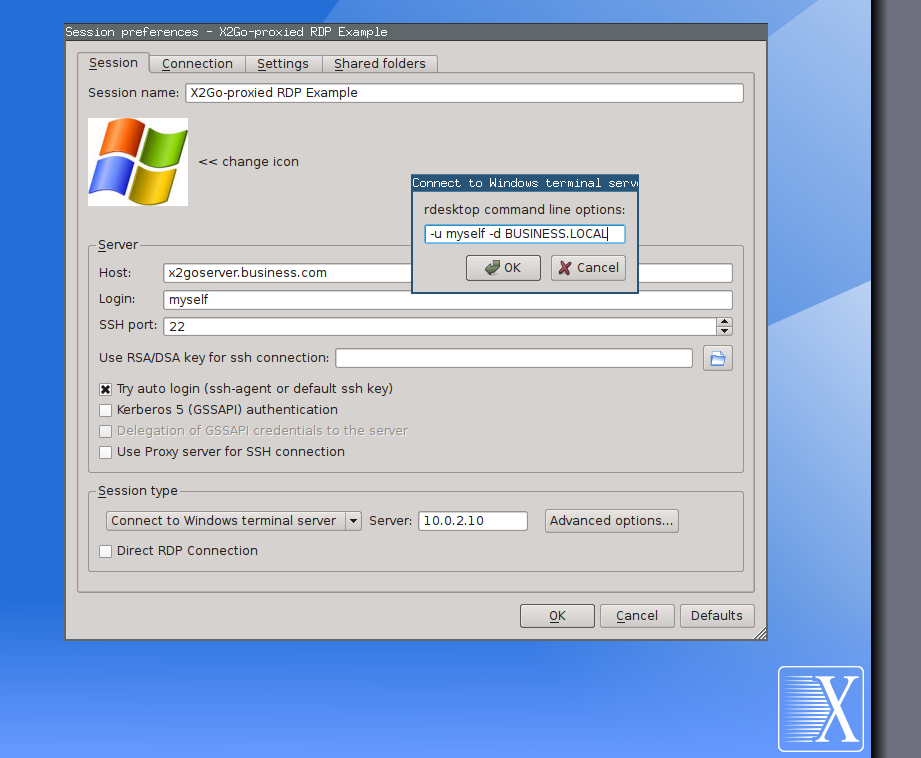
A file was uploaded to your DokuWiki. Here are the details:
File : https://wiki.x2go.org/lib/exe/fetch.php/wiki:advanced:tce:x2go-proxied-rdp.…
Old revision: ---
Date : 2014/04/14 07:06
Browser : Mozilla/5.0 (X11; Linux x86_64; rv:26.0) Gecko/20100101 Firefox/26.0 Iceweasel/26.0
IP-Address : 134.245.254.47
Hostname : m-047.informatik.uni-kiel.de
Size : 94.3 KB
MIME Type : png
User : sunweaver
--
This mail was generated by DokuWiki at
https://wiki.x2go.org/
A page in your DokuWiki was added or changed. Here are the details:
Date : 2014/04/14 07:00
Browser : Mozilla/5.0 (X11; Linux x86_64; rv:26.0) Gecko/20100101 Firefox/26.0 Iceweasel/26.0
IP-Address : 134.245.254.47
Hostname : m-047.informatik.uni-kiel.de
Old Revision: ---
New Revision: https://wiki.x2go.org/doku.php/wiki:advanced:tce:directrdp
Edit Summary: created
User : sunweaver
===== X2Go TCE and MS Terminal Servers =====
X2Go Client can be used to connect to Microsoft Windows Terminal Servers. There are two modes available: X2Go-proxied RDP support and DirectRDP support.
==== X2Go-proxied RDP Sessions =====
=== What is X2Go-proxying ===
With X2Go you can launch any application hosted on a Linux-based X2Go Server. These applications can run inside a full desktop session launched on a remote X2Go Server or these applications can run independently and seamlessly integrate into your local desktop session (e.g. see the
[[wiki:advanced:published-applications|Published Applications]] documentation).
An RDP session is a remote session on an MS Windows machine. With an RDP client application like the '''rdesktop''' command line utility, you can connect to MS Windows desktops and launch remote sessions on that Windows machine from a Linux-based desktop.
An X2Go-proxied RDP session now is an RDP session that gets launched inside an X2Go session.
=== How it works in detail ===
If X2Go Client is used for proxying an RDP session, the session start up goes like this:
o an X2Go Client machine connects to an X2Go Server
o On this X2Go Server the '''rdesktop''' is installed
o From this X2Go Server the MS Windows machine (Terminal Server or Workstation) can be reached (maybe on some internal network)
o X2Go Client launches an X2Go Session and calls the '''rdesktop''' command inside this session (with a special set of parameters)
o The '''rdesktop''' RDP client connects to the MS Windows machine,
starts/resumes an RDP session there
o The RDP client's Windows desktop window appears inside the X2Go Session
o Whatever appears in the X2Go Session gets displayed on the X2Go Client machine
o the X2Go Client can now work on an MS Windows machine
=== Benefits of X2Go-proxied RDP Sessions ===
There are some benefits gained from this approach compared to direct RDP session setups.
o Traffic between server/client is always encrypted via SSH
o On low bandwidth lines, an X2Go-proxied RDP Session might scale better than the native RDP protocol
o The proxying X2Go Server can be used as a firewall pass-through gateway and you can connect to machines behind that firewall
o All SSH-related extra authentication features (SSH pubkey/privkey, OTP authentication, GPG-SmartCard authentication, etc.) can be used for the connection to the proxying X2Go Server (i.e. double secure your network)
=== Session Setup for X2Go-proxied RDP Sessions ===
TODO
==== Direct/Native RDP
Sessions =====
TODO
==== Credits ====
X2Go Client's DirectRDP feature was sponsored by the [[http://rohloff.de|Rohloff AG]] back in 2012.
--
This mail was generated by DokuWiki at
https://wiki.x2go.org/
A page in your DokuWiki was added or changed. Here are the details:
Date : 2014/04/14 06:16
Browser : Mozilla/5.0 (X11; Linux x86_64; rv:26.0) Gecko/20100101 Firefox/26.0 Iceweasel/26.0
IP-Address : 134.245.254.47
Hostname : m-047.informatik.uni-kiel.de
Old Revision: https://wiki.x2go.org/doku.php/wiki:advanced:start?rev=1397456151
New Revision: https://wiki.x2go.org/doku.php/wiki:advanced:start
Edit Summary: [X2Go Thin Client Environment (TCE)]
User : sunweaver
@@ -72,8 +72,9 @@
<WRAP round info>
<menu col=2,align=center,caption="Advanced X2Go Server Setups">
<item>X2Go Thin Client Environement|Installation HowTo|[[wiki:advanced:tce:install]]|{{:wiki:litte-phoca.png|}}</item>
+ <item>X2Go TCE and MS Terminal Servers|Native/Direct RDP Support in X2Go Client|[[wiki:advanced:tce:directrdp]]|{{:wiki:litte-phoca.png|}}</item>
<item>Thin Client Hardware|Experiences and Product
Recommendations|[[wiki:advanced:tce:tested-hardware]]|{{:wiki:litte-phoca.png|}}</item>
</menu>
</WRAP>
===== X2Go Admin Center =====
--
This mail was generated by DokuWiki at
https://wiki.x2go.org/
A page in your DokuWiki was added or changed. Here are the details:
Date : 2014/04/14 06:15
Browser : Mozilla/5.0 (X11; Linux x86_64; rv:26.0) Gecko/20100101 Firefox/26.0 Iceweasel/26.0
IP-Address : 134.245.254.47
Hostname : m-047.informatik.uni-kiel.de
Old Revision: https://wiki.x2go.org/doku.php/wiki:advanced:start?rev=1397455916
New Revision: https://wiki.x2go.org/doku.php/wiki:advanced:start
Edit Summary: [X2Go Thin Client Environment (TCE)]
User : sunweaver
@@ -69,11 +69,14 @@
* [[wiki:advanced:x2gobroker:loadbalancing|Load-balancing with X2Go Session Broker]]
===== X2Go Thin Client Environment (TCE) =====
- * [[wiki:advanced:tce:install|Installation of the X2Go TCE]]
- * [[wiki:advanced:tce:tested-hardware|Experiences with Thin Client Hardware]]
-
+ <WRAP round info>
+ <menu col=2,align=center,caption="Advanced X2Go Server Setups">
+ <item>X2Go Thin Client Environement|Installation
HowTo|[[wiki:advanced:tce:install]]|{{:wiki:litte-phoca.png|}}</item>
+ <item>Thin Client Hardware|Experiences and Product Recommendations|[[wiki:advanced:tce:tested-hardware]]|{{:wiki:litte-phoca.png|}}</item>
+ </menu>
+ </WRAP>
===== X2Go Admin Center =====
X2Go Admin Center is a Qt4 GUI project enabling the administration of users, groups, hosts, X2Go sessions and more (plugins) with the help of a graphical interface. It is (as of 2013-03-15) in the stage of early development.
--
This mail was generated by DokuWiki at
https://wiki.x2go.org/
A page in your DokuWiki was added or changed. Here are the details:
Date : 2014/04/14 06:11
Browser : Mozilla/5.0 (X11; Linux x86_64; rv:26.0) Gecko/20100101 Firefox/26.0 Iceweasel/26.0
IP-Address : 134.245.254.47
Hostname : m-047.informatik.uni-kiel.de
Old Revision: https://wiki.x2go.org/doku.php/wiki:advanced:start?rev=1397455903
New Revision: https://wiki.x2go.org/doku.php/wiki:advanced:start
Edit Summary: [X2Go Printing Revisited]
User : sunweaver
@@ -40,13 +40,8 @@
</menu>
</WRAP>
===== X2Go Printing Revisited =====
-
- * [[doc:installation:printing|Single-node Printing with X2Go]]
- * [[wiki:advanced:multi-node:x2goserver-printing|Multi-Node Printing with X2Go]]
-
-
<WRAP round info>
<menu col=2,align=center,caption="Advanced X2Go Server Setups">
<item>Client-side Printing with X2Go|The default approach for single X2Go Servers|[[doc:installation:printing]]|{{:wiki:litte-phoca.png|}}</item>
--
This mail was generated by
DokuWiki at
https://wiki.x2go.org/
A page in your DokuWiki was added or changed. Here are the details:
Date : 2014/04/14 06:11
Browser : Mozilla/5.0 (X11; Linux x86_64; rv:26.0) Gecko/20100101 Firefox/26.0 Iceweasel/26.0
IP-Address : 134.245.254.47
Hostname : m-047.informatik.uni-kiel.de
Old Revision: https://wiki.x2go.org/doku.php/wiki:advanced:start?rev=1397455486
New Revision: https://wiki.x2go.org/doku.php/wiki:advanced:start
Edit Summary: [X2Go Printing Revisited]
User : sunweaver
@@ -44,8 +44,16 @@
* [[doc:installation:printing|Single-node Printing with X2Go]]
* [[wiki:advanced:multi-node:x2goserver-printing|Multi-Node Printing with X2Go]]
+
+
+ <WRAP round info>
+ <menu col=2,align=center,caption="Advanced X2Go Server Setups">
+ <item>Client-side Printing with X2Go|The default approach for single X2Go Servers|[[doc:installation:printing]]|{{:wiki:litte-phoca.png|}}</item>
+ <item>Multi-Node Printing with X2Go|Printing in X2Go Server
farms|[[wiki:advanced:multi-node:x2goserver-printing]]|{{:wiki:litte-phoca.png|}}</item>
+ </menu>
+ </WRAP>
===== X2Go Session Broker =====
There exist many variants of X2Go Session Brokers in productive business environments. Most of them have been programmed and deployed by [[http://phoca-gmbh.de]] Since 2013 the X2Go project is proud to offer a public X2Go Session Broker implementation that is available as tarball and through our package archives [[sources:start|(and licensed under AGPL-3+)]].
--
This mail was generated by DokuWiki at
https://wiki.x2go.org/
A page in your DokuWiki was added or changed. Here are the details:
Date : 2014/04/14 06:09
Browser : Mozilla/5.0 (X11; Linux x86_64; rv:26.0) Gecko/20100101 Firefox/26.0 Iceweasel/26.0
IP-Address : 134.245.254.47
Hostname : m-047.informatik.uni-kiel.de
Old Revision: ---
New Revision: https://wiki.x2go.org/doku.php/wiki:advanced:authentication:passwordless-gs…
Edit Summary: created
User : sunweaver
===== GSSAPI login with X2Go Client =====
TODO
--
This mail was generated by DokuWiki at
https://wiki.x2go.org/
A page in your DokuWiki was added or changed. Here are the details:
Date : 2014/04/14 06:08
Browser : Mozilla/5.0 (X11; Linux x86_64; rv:26.0) Gecko/20100101 Firefox/26.0 Iceweasel/26.0
IP-Address : 134.245.254.47
Hostname : m-047.informatik.uni-kiel.de
Old Revision: https://wiki.x2go.org/doku.php/wiki:advanced:authentication:passwordless-gp…
New Revision: https://wiki.x2go.org/doku.php/wiki:advanced:authentication:passwordless-gp…
Edit Summary: [GPG card configuration]
User : sunweaver
@@ -198,17 +198,14 @@
<code>
user@x2goclient$ kill $SSH_AGENT_PID
</code>
+
+ ===== Start X2Go Client with GnuPG SmartCard Support =====
Using smart card authentication with x2goclient
<code>
user@x2goclient$ x2goclient --pgp-card
</code>
- or
-
- <code>
- user@x2goclient$ x2goclient_gtk --pgp-card
- </code>
--
This mail was generated by DokuWiki at
https://wiki.x2go.org/